Update trustmnw-cli to 1.2.1 on Ubuntu
Full guide with moving and troubleshooting.
Update one validator at a time. Log in over SSH as the user that runs the validator (not root) and don't use sudo for nvm, npm or trustmnw-cli.
What not to do
- Don't use sudo or a root shell (
su root,sudo -i) for nvm, npm or trustmnw-cli.Root has its own Node: the new CLI lands there, and your validator keeps running the old version.
- Don't run the same validator on two machines at once ("another node running"). See moving.
- Don't accept npm's offer to upgrade npm to a new major version, and don't use
npm updateor an unpinned@latest. Always install an exact version. - Don't install Node a second way (apt
nodejs, Homebrew) next to nvm. Two Node installs make it unclear which trustmnw-cli runs. - Don't press Enter or Ctrl+C while the install is still printing lines.
- Don't update all validators at once. One server at a time, and check each on the dashboard before the next.
A. Check the latest version
npm view @morpheusnetwork/trustmnw-cli dist-tags
npm view @morpheusnetwork/trustmnw-cli@1.2.1 engines
Expected: For a newer version, replace 1.2.1 and check its Node requirement before you start. npm may also print "New major version of npm available": ignore it.latest: '1.2.1' and { node: '^26.0.0' }.
B. Update a validator
Check and back up
which node
trustmnw-cli --version
trustmnw-cli status
Expected: a path under
~/.nvm(e.g./home/<user>/.nvm/versions/node/v20.9.0/bin/node), the current CLI version (write it down), and node connected. Ifwhich nodeshows/usr/bin/node, see E3.Take a snapshot of the VPS in your provider's panel.
Log out and stop
trustmnw-cli logout && trustmnw-cli stop"Daemon is not running" is fine: it was already stopped.
Logging out matters: on a staked validator, only stopping and restarting left it "disconnected" (see E9).
Install Node 26
nvm install 26
nvm alias default 26
node -v
Expected: "Now using node v26.x (npm v11.x)" and v26.x (v26.13.1 at time of writing). Node 20.9.0 stays installed next to it, with your old CLI.
Install trustmnw-cli 1.2.1
npm install -g @morpheusnetwork/trustmnw-cli@1.2.1 --loglevel verbose
trustmnw-cli --version
The verbose output keeps scrolling while it works; wait until you get your prompt back. It usually takes less than a minute.
Expected version: 1.2.1. If it looks stuck or fails, see E1 and E2.
Log in and check
trustmnw-cli login
trustmnw-cli status
Log in with your KYC email and the code you receive.
loginalso starts the node.Expected: node connected. If it shows unstaked, wait 30 seconds for the next status update.
On trust.supply the node should show online, and rewards should keep coming in. For the first validator, watch it for a few hours. Then move on to the next one.
C. Move a validator to a new server/VPS
Tested 18 November 2026. Prepare the new server completely first, so the validator is offline for only a minute or two.
Tested 18 November 2026. Prepare the new server completely first, so the validator is offline for only a minute or two.
1 · On the new server
Install nvm, Node 26 and the CLI as your normal user (nvm install steps as in the installation manual, chapter "Install trustmnw-cli"):
nvm install 26
nvm alias default 26
npm install -g @morpheusnetwork/trustmnw-cli@1.2.1 --loglevel verbose
trustmnw-cli --version
Expected: 1.2.1. Don't log in yet.
2 · On the old server, just before you log in on the new one
trustmnw-cli logout && trustmnw-cli stop3 · On the new server
trustmnw-cli login
trustmnw-cli status
Log in with your KYC email and the code you receive. login also starts the node.
Expected: node connected. Then check on trust.supply that the node shows online.
Never run the same validator on two machines at once. Don't start the CLI on the old server again. Only cancel the old VPS after the new one has run well for a while.
Old server no longer accessible, so you can't log out there? Use the Reset button on Trust.Supply: see E10.
D. Go back to the old version
Your old CLI is still installed under Node 20.9.0. Switch back to it:
trustmnw-cli logout && trustmnw-cli stop
nvm alias default 20.9.0
Open a new SSH session, then:
node -v
trustmnw-cli --version
trustmnw-cli login
trustmnw-cli status
Expected: v20.9.0, your old CLI version, node connected.
E. Troubleshooting
E1The install looks stuck
With --loglevel verbose new lines keep appearing; without it, npm shows a single progress line that can look frozen for several minutes. npm WARN deprecated … lines are harmless. Only if nothing new appears for 15 minutes: press Ctrl+C. If that doesn't work, open a second SSH session and run:
pkill -u $USER -f "npm install"Then check memory and clear npm's cache before trying again:
free -m
npm cache clean --force
npm install -g @morpheusnetwork/trustmnw-cli@1.2.1 --loglevel verbose
Very little free memory (under ~200 MB available) can stall the install. Make sure the validator is stopped (step 2) before you install.
E2Install fails with ENOTEMPTY
A failed earlier install left a hidden .trustmnw-cli-… folder behind. Remove it for the Node version you are installing into, then install again. For example, for Node 20.9.0:
ls -a ~/.nvm/versions/node/v20.9.0/lib/node_modules/@morpheusnetwork/
rm -rf ~/.nvm/versions/node/v20.9.0/lib/node_modules/@morpheusnetwork/.trustmnw-cli-*E3Root versus your validator user
Your validator runs under your normal user, with Node from ~/.nvm. If you install as root (sudo, su root, sudo -i), npm uses root's own Node, and your user still runs the old CLI. Check as your normal user:
whoami
which node
trustmnw-cli --version
If the version didn't change, install again as your normal user without sudo. A leftover root copy can be removed with sudo -i, then npm uninstall -g @morpheusnetwork/trustmnw-cli, then exit. If which node shows /usr/bin/node, Node came from apt instead of nvm; install nvm first as in the installation manual.
E4"Please authorize first using command trustmnw-cli login"
This validator was not logged in (for example on a fresh server, or after a logout). Run:
trustmnw-cli login
trustmnw-cli status
login also starts the node. Use the same KYC email as on trust.supply.
E5The validator starts again by itself during the update
If you set up a cron job or script that restarts the validator, it can start the old daemon again within a minute and get in the way of the install. Check for a running daemon and for cron jobs:
ps -e -o pid,cmd | grep daemon.js | grep -v grep
crontab -l
Pause such a job during the update (crontab -e, put # in front of its line) and remove the # again afterwards. If the job calls a path with v20.9.0 in it, change that to the Node 26 path (see ls ~/.nvm/versions/node).
E6"trustmnw-cli: command not found" or the old version after switching Node
An SSH session that was open before nvm alias default 26 may still use Node 20. Open a new SSH session, or run nvm use default. Then check node -v and trustmnw-cli --version. If the CLI is missing under Node 26, repeat step 4.
E7The dashboard says your version is outdated
The dashboard may still show the version reported at your last login. Log out and in again so it refreshes:
trustmnw-cli logout && trustmnw-cli stop
trustmnw-cli login
trustmnw-cli statusE8"Another node running"
E9Status shows "disconnected" with "API request failed"
Seen on a staked validator after only stopping and restarting it: the daemon runs, but status shows
Status: disconnected
Connection: Connecting to API
Last connection error: API request failed.
Node: staked
Fix: log out, stop, and log in again.
trustmnw-cli logout && trustmnw-cli stop
trustmnw-cli login
trustmnw-cli status
Expected: node connected. This is why the update steps now log out before the install.
E10The old server is gone and you never logged out
You could not run trustmnw-cli logout because the old server or VPS is no longer accessible. Use the Reset button on Trust.Supply instead:
- Go to Trust.Supply and unlock MetaMask.
- Connect your wallet.
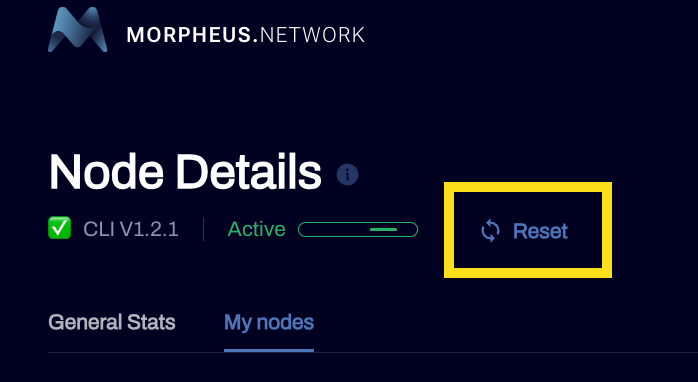
- On Node Details, press Reset (next to the CLI version and status).
- Log in on the server you want to use:
trustmnw-cli login
trustmnw-cli status
Expected: node connected.
Based on the Masternodes Setup Guide by @trippledutch and tests of 17–18 Nov 2026 · Full guide version 2.1 (18 Nov 2026): log out and stop before the install, log in after it; new E9 · v2.0: trustmnw-cli 1.2.1 on Node 26.